![Vivid Gold - Video Game Outlet [KE]](http://vividgold.co.ke/cdn/shop/files/vivid_gold_Inverted_Color_Transparent_bg_1.svg?v=1776417429)


Recent Articles


Xbox Isn't Dead: How New Leadership Just Silenced the Critics
13 Jun 2026
Why Most PC Gamers Are Choosing 1440p Over 4K
26 May 2026Best TCL TVs for Gaming in 2026: Find Your Perfect Match
22 Jun, 2026
Not everyone wants to game on a small monitor. If you're a console gamer who prefers a big-screen experience, choosing the right TV matters just as much as choosing the right console. TCL has built a reputation for delivering premium gaming features at more accessible price points, and their 2026 lineup continues that tradition. Here are the best TCL TVs for gaming in 2026 from the flagship to the value sweet spot. TCL C8L: The Flagship Gaming TV If budget isn't your primary concern, the TCL C8L (also known as the QM8L in the US) is arguably TCL's strongest gaming TV in 2026 . It's designed for players who want uncompromising picture quality and top-tier gaming features. Key Gaming Specifications: Display: 4K SQD-Mini LED panel with WHVA 2.0 Ultra technology Refresh Rate: Native 144Hz, with VRR support Local Dimming: Up to 4,032 zones on the 98-inch model; 1,008 zones on the 55-inch model Peak Brightness: Up to 6,000 nits on larger models, 3,000 nits on 55-inch Gaming Features: AMD FreeSync, Game Master mode, HDMI 2.1 ports Color Coverage: 100% BT.2020 color gamut HDR Support: Dolby Vision IQ, HDR10+, HLG Audio: 2.2-channel system tuned by Bang & Olufsen with Dolby Atmos and DTS support What It Delivers: The C8L pushes Mini LED technology to its limits. The massive number of local dimming zones combined with extreme peak brightness means HDR content whether games or movies looks stunning with incredible contrast. For competitive gamers, the 144Hz native refresh rate and VRR support ensure smooth, tear-free gameplay. Perfect For: Enthusiasts who want the absolute best picture quality and are willing to pay for flagship performance. TCL C7L: The Value Sweet Spot Not everyone needs the flagship. The TCL C7L offers many of the same premium gaming features at a lower price point, making it arguably the best value gaming TV in TCL's 2026 lineup . Key Gaming Specifications: Display: 4K SQD-Mini LED panel with HVA 2.0 Pro technology Refresh Rate: Native 144Hz, VRR up to 288Hz via Game Accelerator Local Dimming: 800 zones (55-inch) up to 2,176 zones (98-inch) Peak Brightness: Up to 3,000 nits on larger models Gaming Features: AMD FreeSync Premium Pro, Game Master mode with Game Bar UI, HDMI 2.1 ports Color Coverage: 100% BT.2020 color gamut HDR Support: Dolby Vision, HDR10+, HLG Audio: 2.2-channel system tuned by Bang & Olufsen with Dolby Atmos What It Delivers: The C7L delivers the same 144Hz native refresh rate as the flagship C8L, with VRR that can push to 288Hz in compatible scenarios. The 3,000-nit peak brightness (on 65-inch and larger models) is still exceptional for HDR gaming, and the local dimming zones are more than adequate for deep blacks and precise backlight control . TCL's Game Master mode gives you quick access to gaming settings like low latency, shadow enhancement, and on-screen crosshairs. Perfect For: Most PS5 and Xbox Series X gamers who want premium gaming features without paying flagship prices. What to Look for in a Gaming TV Don't buy a TV just because the box says "Gaming." Instead, look for these essential features they make a bigger difference than most picture settings: Feature Why It Matters HDMI 2.1 Required for 4K at 120Hz+; essential for PS5 and Xbox Series X 120Hz or 144Hz Native Refresh Rate Ensures smooth motion during fast-paced gameplay VRR (Variable Refresh Rate) Eliminates screen tearing; TCL's Game Accelerator pushes to 288Hz ALLM (Auto Low Latency Mode) Automatically switches to game-optimized settings Low Input Lag Critical for responsive competitive play Game Master / Game Bar Quick access to gaming settings and visual aids The Verdict: Which TCL Should You Choose? If You Want... Choose... The absolute best picture quality and brightness TCL C8L Premium gaming features at a better price TCL C7L HDMI 2.1, high refresh rate, and VRR Both C8L and C7L deliver A future-proof TV for PS5 and Xbox Both are HDMI 2.1 ready and optimized for current-gen consoles A great console deserves a great display. Because no matter how powerful your gaming hardware is, you'll only enjoy it as much as the screen you're playing on.
Why Most PC Gamers Are Choosing 1440p Over 4K
26 May, 2026
4K gaming looks incredible. The sharpness, the detail, the sheer visual clarity on paper, it's the ultimate way to play. But here's the reality: most PC gamers are still choosing 1440p instead. And honestly, that choice makes perfect sense. While 4K might be the dream, 1440p is what most PC gamers actually want to live with every day. Let's break down why. The Performance Trade-Off: Visuals vs. Frame Rates While 4K delivers undeniably sharper visuals, it comes with a massive performance cost. Driving four times as many pixels as 1080p (and significantly more than 1440p) demands serious GPU power. Resolution Total Pixels Relative GPU Demand 1080p ~2 million Baseline 1440p ~3.7 million ~1.8x 1080p 4K ~8.3 million ~4.5x 1080p The result of that demand: Lower frame rates: Even high-end GPUs struggle to maintain 120+ FPS at 4K in demanding titles. Higher temperatures: More pixels pushed = more heat generated. More expensive hardware: You're paying a premium just to keep the game playable. The Sweet Spot: Why 1440p Hits Perfectly 1440p sits right in the middle between visual quality and performance and for most gamers, that's the ideal balance. What 1440p delivers: Sharp, detailed visuals: Games still look fantastic, with clear textures and minimal aliasing. High frame rates: You can comfortably push 120fps, 144fps, or even 240fps without needing a flagship GPU. Lower system requirements: A mid-range graphics card can handle 1440p gaming beautifully. It's the resolution where "good enough" meets "actually achievable" for most budgets. The Cost Problem: 4K Hardware Is Getting Insane To fully enjoy consistent 4K gaming especially at high refresh rates you generally need top-tier hardware: RTX 4080 or 4090: Current generation flagships capable of 4K/120fps in many titles. Future GPUs: Even newer cards will be expensive at launch. Complete System Cost: A 4K-ready PC can easily exceed $2,500–$3,000. Compare that to 1440p: Mid-range GPUs like RTX 4070, RX 7800 XT: More than capable of excellent 1440p performance. Budget-friendly builds: You can build a solid 1440p rig for half the cost of a 4K machine. The price gap is real, and it's growing. As GPU prices continue to climb, 1440p becomes an increasingly sensible choice. Competitive Gaming: Frame Rate Over Pixels For competitive gamers those playing Valorant, Counter-Strike, Apex Legends, Call of Duty, or Overwatch smoother gameplay matters far more than extra pixels. Higher frame rates provide: Better responsiveness: Your inputs register faster. Reduced input delay: Every millisecond counts in competitive play. Smoother motion tracking: Easier to follow fast-moving targets. A genuine competitive advantage: Higher refresh rates (144Hz, 240Hz, 360Hz) are standard in esports. At 1440p, you can push those high frame rates consistently. At 4K, even the best GPUs struggle to maintain competitive-level refresh rates in demanding titles. The Reality Check: What Most Gamers Actually Use Steam's hardware survey consistently shows that the majority of PC gamers are not on 4K. The most popular resolutions remain 1080p and 1440p. Resolution Typical User 1080p Budget builds, esports-focused players, older monitors 1440p The enthusiast sweet spot, high refresh rate gaming 4K High-budget builds, content creators, single-player immersion 4K has its place especially for cinematic single-player experiences on large, high-quality displays. But for everyday gaming? Most players are voting with their wallets, and they're choosing 1440p. The Verdict: 4K Is the Dream, 1440p Is the Reality Here's the honest breakdown: If You Want... Choose... Maximum visual fidelity for single-player games 4K (if budget allows) High frame rates for competitive play 1440p The best balance of visuals and performance 1440p To save money on GPU and monitor costs 1440p To future-proof for several years 1440p (easier to drive for longer) 4K gaming looks amazing, but it demands flagship hardware, sacrifices frame rates, and costs significantly more. For most PC gamers including enthusiasts who care about both visuals and responsiveness 1440p is simply the smarter choice. What's Your Resolution? Are you team 1440p or team 4K? What resolution do you actually game on, and why? Let us know in the comments!

Gaming in Kenya? Avoid These 5 TV Models at All Costs
02 Feb, 2026
Buying a new TV for your PS5, Xbox, or PC in Kenya is exciting. With so many options at different price points, it's tempting to go for the biggest screen at the lowest cost. However, not all TVs are created equal especially for gaming. Choosing the wrong model can turn your immersive experience into a frustrating slideshow of input lag, motion blur, and unreliable performance. To save you from buyer's remorse, here are five TV types and brands you should absolutely steer clear of for serious gaming. 1. Royal TVs: The Input Lag Nightmare The Problem: Extremely high input lag and poor motion handling. Why They're Bad for Gaming: These TVs are often priced aggressively to attract budget-conscious buyers. However, their internal processing is slow, causing a significant delay between your controller input and the action on screen. In fast-paced games like Call of Duty or EA Sports FC, this makes precise timing impossible. The motion also tends to look choppy and blurry during panning shots. The Verdict: A cheap TV that will make your expensive console feel broken. The cost-saving isn't worth the ruined experience. 2. Infinix TVs: Sluggish Software, Gaming Afterthought The Problem: Unresponsive smart interfaces and lack of gaming-centric features. Why They're Bad for Gaming: While Infinix TVs might be adequate for casual streaming, their operating systems are often sluggish. This lag extends to the HDMI ports, resulting in noticeable input delay. They typically lack fundamental gaming features like a Game Mode (which reduces processing lag), Variable Refresh Rate (VRR), or Auto Low Latency Mode (ALLM). The Verdict: Built as media consumption devices, not gaming displays. You'll feel like you're fighting the TV to play your game. 3. Skyworth Smart TVs: Unreliable Performance The Problem: Inconsistent quality, buggy software, and blurry motion. Why They're Bad for Gaming: Skyworth's budget offerings are a gamble. You might deal with laggy menus, apps that crash, and significant motion blur during gameplay. They often advertise "gaming features" but implement them poorly, leading to a sub-par, unreliable experience. The lack of consistent performance updates is another major red flag. The Verdict: "Budget-friendly" often means cutting corners where it matters most for gamers: consistent, responsive performance. 4. Generic "Shell" Brands (Roch, ITEL, GLD, etc.): The Ticking Time Bombs The Big Warning: This is the most critical category to avoid. The Problem: These are not TV manufacturers. They are brands that purchase generic, off-the-shelf chassis from white-label factories in China, slap on their logo and a fancy box with misleading specs. Why They're Catastrophic for Gaming: Deceptive Marketing: They liberally use terms like "120Hz" (usually referring to motion interpolation, not native refresh rate) and "HDMI 2.1" on the box, tricking you into thinking you're getting a high-performance gaming TV. Cheap, Unreliable Components: They use the lowest-cost power boards and capacitors. Modern consoles push high data bandwidth and generate heat. These TVs are not engineered to handle this sustained load. The Result: You are very likely buying a literal ticking time bomb. A common failure is a fried capacitor when the console tries to output a high-bandwidth HDR signal, leaving you with a dead TV and no meaningful warranty support. The Verdict: The ultimate false economy. You risk losing your entire investment on a product designed to be disposable. Never buy a gaming TV from a brand that is not a recognized display manufacturer. 5. Unbranded or "Shop" TVs (Mitashi, etc.) The Problem: Zero quality control, no support, and dangerous failures. Why They're Bad for Gaming: These are the deepest end of the generic pool. Sold in local electronics shops or online marketplaces, they have no brand reputation to uphold. They suffer from all the problems of generic shells but with even less accountability. The risk of permanent damage to your console's HDMI port due to power surge or signal issues is real. The Verdict: An immense risk to both your money and your gaming hardware. Just walk away. What Should You Buy Instead? (The Smart Investment) Don't despair! For a good gaming experience in Kenya, look for established brands that invest in panel quality and gaming tech, even in their mid-range models. Prioritize these features: A Dedicated Game Mode: Non-negotiable for reducing input lag. 4K @ 120Hz Support (for PS5/Xbox Series X): Ensure the HDMI port natively supports this, not just via software trickery. VRR (Variable Refresh Rate): Eliminates screen tearing. Low Input Lag (<20ms): Check professional reviews on sites like RTINGS.com. Trusted Brands: Look at Samsung (Crystal UHD, QLED series), LG (NanoCell, OLED), Sony(Bravia X80/90 series), and TCL (C-series) which have official distribution and service in Kenya. The Bottom Line: Don't Waste Your Console's Potential Your PS5 or Xbox Series X is a powerful piece of technology designed to deliver stunning, responsive gameplay. Pairing it with a TV built from cheap, unreliable components is like putting cheap, used tires on a sports car—you'll never experience what it's truly capable of, and you might crash. Invest in a display from a reputable brand that matches your console's capabilities. Your gameplay, and your wallet in the long run, will thank you. Have you had a bad experience with a gaming TV in Kenya?

PlayStation’s family is growing. A monitor with a door handle
15 Nov, 2025
PlayStation's family is expanding, but this time, it's not a console. During the recent State of Play Japan, Sony unveiled a new product that's turning heads and raising eyebrows: a PlayStation-branded 27-inch gaming monitor—complete with a built-in DualSense charging hook that looks suspiciously like a door handle. Scheduled for a 2026 release, this monitor marks another strategic step for PlayStation into the PC gaming ecosystem. But with specs that seem to look beyond the current PS5, is this a visionary product or a puzzling misstep? Let's break it down. The Specs: Solid, But Is It Enough for 2026? On paper, the monitor boasts a feature set that seems tailored for a hybrid PlayStation/PC user: Display: 27-inch IPS panel with 2K (QHD) 1440p resolution Console Performance: Up to 120Hz refresh rate on PS5 PC/Mac Performance: Up to 240Hz refresh rate Features: Auto HDR tone mapping, Full VRR support Ports: HDMI 2.1, DisplayPort 1.4 The "Hook": A built-in, slide-down hook for storing and charging your DualSense controller, designed to reduce desk clutter. The specs are solid, but in a 2025 market racing towards 4K, OLED, and higher refresh rates as the new standard, a 1440p IPS panel in 2026 feels... safe. For a premium brand like PlayStation, many expected a showcase product that pushes visual boundaries, not one that meets the current mid-tier baseline. The "Door Handle" and The Real Strategy: Future-Proofing for PS6 The most talked-about feature isn't a spec, it's the design of the DualSense hook, which slides down in a way that uncannily resembles a car door handle. While its purpose is to declutter your desk, its design has become an instant meme. But the bigger question is: Who is this for? The 240Hz refresh rate is a clear giveaway. The PS5 struggles to maintain 120Hz in many titles, making this high frame rate almost entirely for the PC market. This aligns perfectly with recent industry rumors and Sony's own admissions. The PC Play: Leaks continue to hint at a PlayStation launcher for PC, similar to Xbox Game Pass. A monitor like this would be the perfect first-party hardware to complement that software push. The PS6 Tease: Sony has publicly stated they've reached the limits of the PS5's hardware, shifting focus to optimization. A 240Hz-capable monitor in 2026 feels less like an accessory for the PS5 and more like a piece of future-proofing for the PS6, which could potentially target higher, more stable frame rates. It's a confusing signal. While PlayStation is building a hardware bridge to the future, its main competitor, Xbox, is aggressively building a subscription-based software empire. It feels like two very different strategies are at play. The Verdict: A Niche Product with an Identity Crisis The PlayStation monitor presents a real dilemma for consumers. Why choose this over a modern 65-inch QLED TV that offers true 4K 120Hz with VRR and a cinematic experience? This monitor seems designed for a very specific user: the dedicated PC gamer who also owns a PS5 and is planning for the next console generation. For everyone else, the value proposition is less clear. Ultimately, this feels like a first-generation product—a testing of the waters. Let's just hope there isn't a "Slim" or "Pro" version announced six months later. For now, the PlayStation monitor is a fascinating, if slightly puzzling, glimpse into Sony's multi-platform future. What do you think? Is this a must-buy for your setup, or is PlayStation missing the mark?
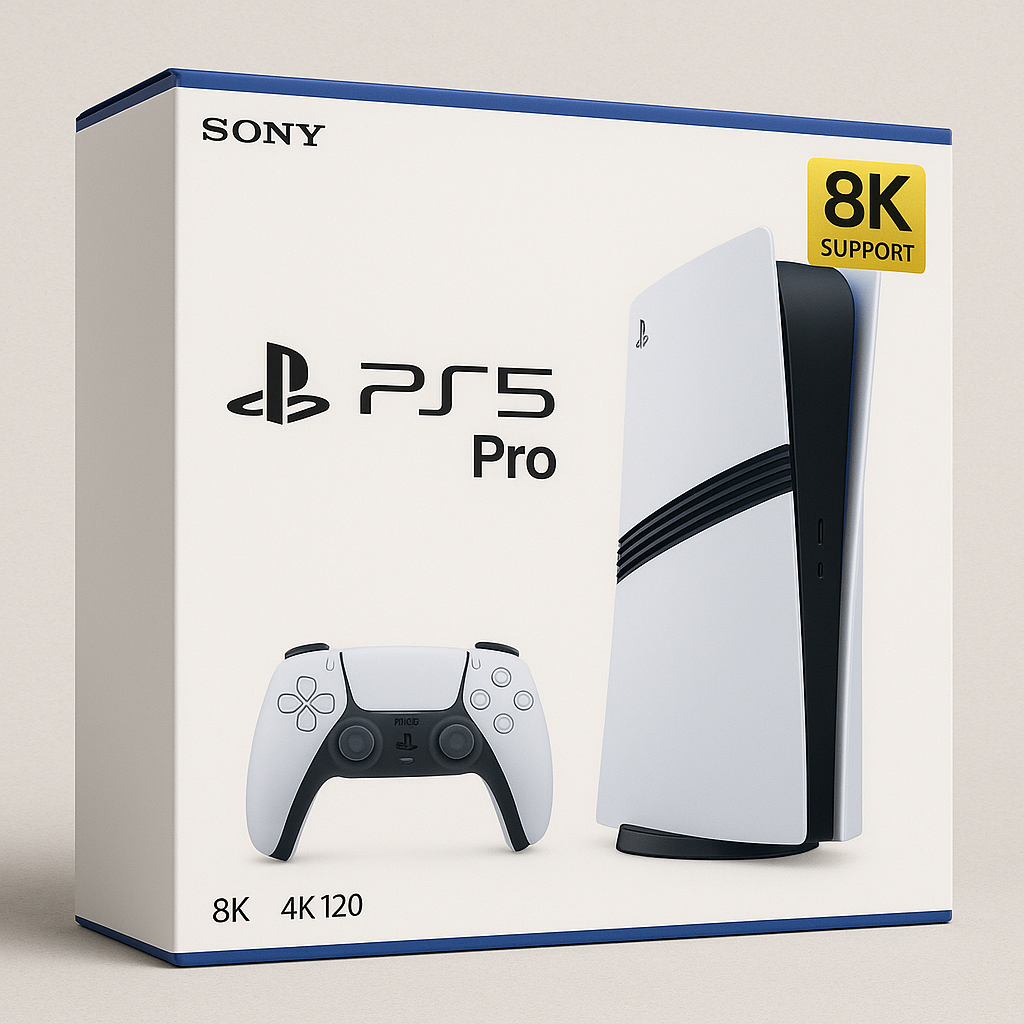
PS5 Pro and 8K: Hype vs Reality
13 May, 2025
If you’ve ever unboxed a PS5 Pro, you’ve probably seen that shiny “8K” logo stamped somewhere on the box. It’s big, it’s bold, and it sounds futuristic as hell. But here’s the thing, that 8K badge is more marketing flex than gameplay reality. Let’s unpack what “8K support” really means for the PS5 Pro, and whether you’re actually going to be gaming in Ultra-Mega-Crystal-High-Definition anytime soon. Can the PS5 Pro Do 8K? Technically? Yes.Practically? Not really! The PS5 Pro can output 8K resolution, but only if the game supports it and if you’ve got an 8K TV. That’s a very big “if,” multiplied by two. And here's the thing, almost no PS5 games are developed to run natively at 8K. Why? Because rendering a full modern game at 8K is like asking your console to sprint a marathon while juggling flaming swords. It’s just not efficient, or necessary, for most developers. Why Developers Don’t Bother with 8K (Yet) Let’s be real, game devs aren’t trying to melt your console. They’re focused on: 4K resolution at higher frame rates (60fps, 120fps) Better ray tracing Faster load times Stable performance 8K textures and assets are massive, and the performance cost isn’t worth the payoff, especially when most players don’t even own 8K displays. The math just doesn’t add up. So What’s the 8K Label Actually Mean? In reality the 8K label just means that the PS5 Pro can output an 8K signal, not that games are rendered at 8K. Think of it like this... you’ve bought a sports car that can hit 300km/h. But you’re still driving it through rush hour traffic at 80. The potential is there, but the road (or in this case, the software) isn’t ready for it. Where 8K Actually Shows Up: Photo Modes The closest you’ll get to 8K content on PS5 Pro today? Photo mode. Games like: Spider-Man 2, Horizon Forbidden West, Gran Turismo 7 and others let you snap ultra high res screenshots. These images are rendered frame by frame, not in real time, so they can hit crazy pixel counts without killing your console. It’s awesome for wallpaper lovers and virtual photographers, but it’s not actual 8K gameplay. The Future of 8K Gaming on Consoles Will we ever see real 8K gaming on consoles like the PS5 Pro? Maybe. But probably not anytime soon. Most developers aren’t designing for it, and even Sony isn’t pushing it. The latest updates and marketing around the PS5 Pro focus on: 4K fidelity mode enhancements New ray tracing features AI upscaling (like PlayStation Spectral Super Resolution) …not 8K gameplay. The focus is on smarter rendering not higher pixel counts. So, Should You Care About 8K on PS5 Pro? Honestly? Not right now. You’re better off caring about frame rate, ray tracing, load speeds, and visual stability. That’s where the PS5 Pro is really delivering. 8K is just a cherry on top for future proofing. A nice sticker to slap on the box, but not something you'll experience in most games anytime soon. Still holding out for native 8K gameplay? Or are you happy with 4K? Let’s talk in the comments and until next time, stay golden!
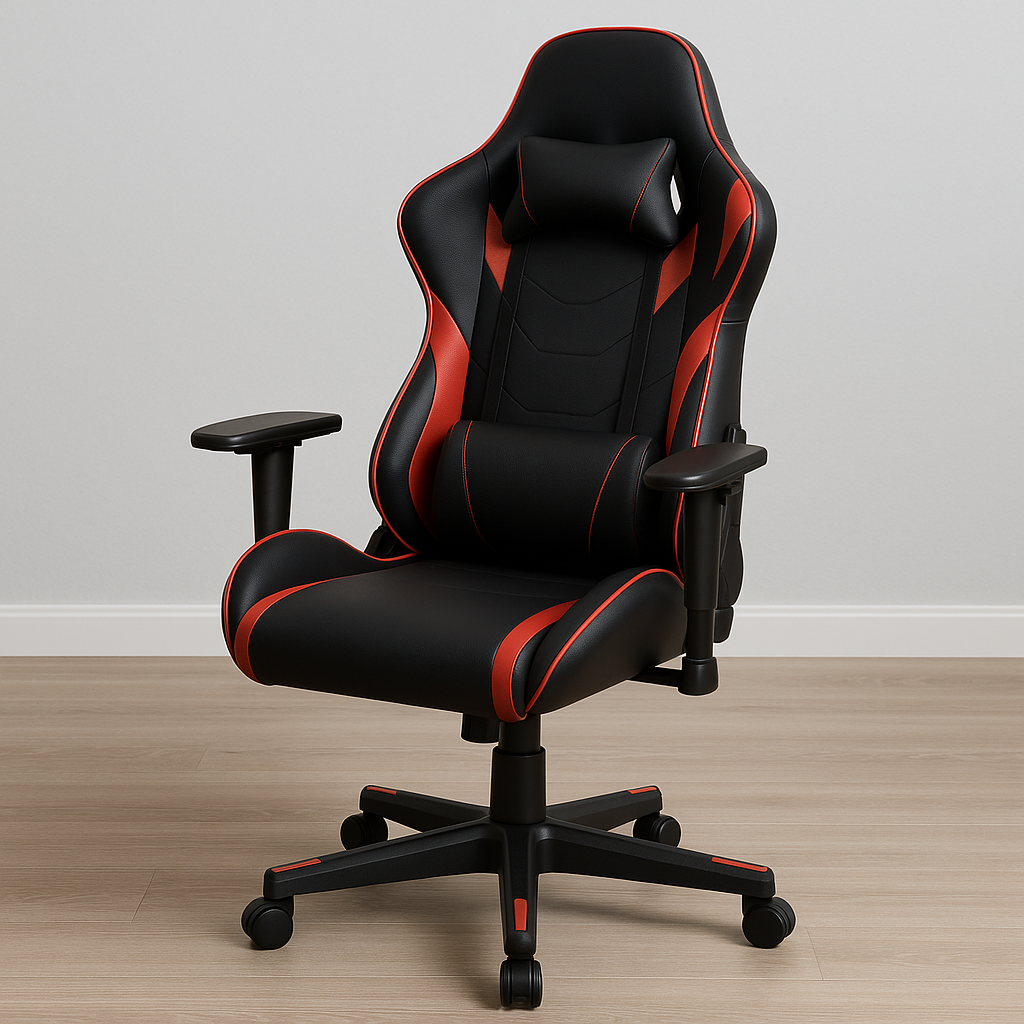
Gaming Chair Buying Guide
29 Apr, 2025
While a good chair might not give you a killstreak, a bad one can absolutely ruin your session (and your spine). Choosing the right gaming chair isn’t just about flashy colors and bucket seat designs it’s about finding the perfect balance between style, support, and long-term comfort. Let’s talk about what really matters when picking the right one. Ergonomics: More Than Just a Buzzword It’s easy to get distracted by the race-car looks some gaming chairs throw at you. But here’s the truth: ergonomic design should be your top priority. Look for chairs with adjustable lumbar support, a headrest that actually aligns with your neck, and armrests that go way beyond just up and down (4D armrests). Height, depth, and angle adjustments are game-changers (literally). Your body will thank you after those gaming sessions. A chair that fits your body properly reduces fatigue, improves posture, and keeps you locked in for longer. Gaming is a physical activity, even if it doesn’t always feel like it. Think of your chair as part of your gear it should work with you, not against you. Build Quality The market is flooded with budget chairs that look premium but cut corners on materials. Pay attention to the details: 1. High-density foam over cheap padding Too soft and it sinks under pressure; too firm and you might as well be sitting on a hardwood floor. Look for high-density foam or cold-cure foam materials designed for longevity and support. 2. Sturdy metal frames instead of plastic Look for chairs with a solid steel frame and a weight rating that suits your build. The base should be metal (not plastic), and the casters should roll smoothly. After all, you want your chair to survive not just long hours of gameplay, but the occasional frustrated push-off or lean-back. 3. Weight capacity Chairs that support higher weight limits tend to be more durable overall. If you’re going to be sitting for hours every day, you want something that’s going to hold up and not start creaking like a haunted house every time you shift your weight. Adjustability No two gamers are alike, and your chair should adapt to you not the other way around. Want to recline during a cutscene or a stream? Need to lock the chair in an upright position for high-focus matches? A good gaming chair lets you do both with ease. Adjustable seat height is a must, but tilt tension, backrest angle, and even seat depth should be part of the equation if you’re going premium. The more customizable your chair is, the more likely it’ll suit your individual posture and play style. Breathability: A Hot Topic (Literally) If you live in a warmer climate or just tend to run hot a breathable mesh back or ventilated seat can be a game-changer. Faux leather chairs trap heat, which can turn your gaming session into a sweaty ordeal. Mesh chairs or those with breathable fabric covers might not have the same “premium” aesthetic, but they deliver serious comfort over time. Your back will stay cooler and your clothes will stick less. It’s a small detail that makes a big difference. Price vs. Value: Know When to Invest Price doesn’t always equal comfort. Look for value in the form of solid materials, good warranty support, and a brand with decent reviews. If you can, test one in person or make sure there’s a generous return policy. You’ll be surprised how different two chairs can feel at the same price point. Final Verdict When shopping for the right gaming chair, focus on what truly impacts your comfort and performance. Prioritize ergonomic support. Choose breathable, durable materials that suit your environment. Make sure the chair offers a wide range of adjustability. And finally, don’t overlook build quality. You’re not just buying a place to sit you’re investing in your health, comfort, and performance. A great gaming chair keeps you supported during your longest sessions and makes it easier to focus on what really matters: the game.

LG UltraGear Monitor Review
13 Nov, 2024
If you’re in the market for a premium gaming monitor that combines top-tier features with practical design, the LG UltraGear 34-inch Ultrawide is a standout option worth considering. This monitor delivers a top-notch gaming experience with a 3440x1440 resolution and an 800R curve, perfect for full immersion in fast-paced games, all displayed on a vibrant OLED panel known for its sharpness and color depth.Stunning Visuals and Top Performance for GamersThe LG UltraGear doesn’t just look impressive—it performs at a level that can meet the demands of serious gamers. Its 240Hz refresh rate ensures ultra-smooth motion, minimizing any blur during rapid movements. The monitor is compatible with both AMD FreeSync and NVIDIA G-SYNC, guaranteeing tear-free gameplay whether you're using an AMD or NVIDIA graphics card. This means the visuals will stay smooth, free of stuttering or screen tearing, giving you a fully immersive experience without distractions.For console gamers or those with high-performance gaming PCs, the HDMI 2.1 support is a huge bonus. It enables compatibility with the latest devices like the PS5 Pro, ensuring you’re getting the most out of your gear. As a finishing touch, the UltraGear includes DTS Headphones:X, which brings 3D audio into the mix. This audio feature pulls you deeper into the action, making in-game sounds feel layered and lifelike, as if you’re truly inside the game.Sleek, Gamer-Friendly DesignLG has given the UltraGear a design that’s a mix of modern minimalism and gaming flair. The monitor features a smooth back panel and subtle RGB lighting that adds a touch of personality without overwhelming the design. The 800R curve is another impressive feature that sets the UltraGear apart. This aggressive curve wraps around your field of vision, allowing for a more immersive experience, although it may take a little getting used to if you’re used to flat screens.OLED Brilliance with Deep Blacks and Vivid ColorsOne of the UltraGear’s most striking qualities is the image quality provided by its OLED panel. Known for delivering nearly infinite contrast ratios, OLED technology allows for deep, true blacks and highly detailed images without the need for traditional dimming zones. This absence of blooming and backlight bleed results in a rich, high-impact viewing experience that makes each game look its best. The monitor also has a matte screen coating, which does an excellent job at minimizing reflections, making it easier to enjoy gaming in well-lit rooms without any distracting glare.A Gaming Monitor That Truly Stands OutThe LG UltraGear is a powerful, visually stunning gaming monitor that combines performance, design, and quality. Whether you’re an avid gamer or a casual player, this monitor brings an immersive, high-quality experience to every session. From its 240Hz refresh rate and 800R curve to its OLED panel with exceptional contrast, LG has crafted a display that’s hard to beat in the gaming world. Have you tried the LG UltraGear, or are you thinking about getting one? Let’s discuss your thoughts in the comments below! Until next time, stay golden.

Samsung Odyssey G7 32" Review
12 Oct, 2024
If you’re in the market for a gaming monitor that does it all, the Samsung Odyssey G7 32" should definitely be on your radar.